


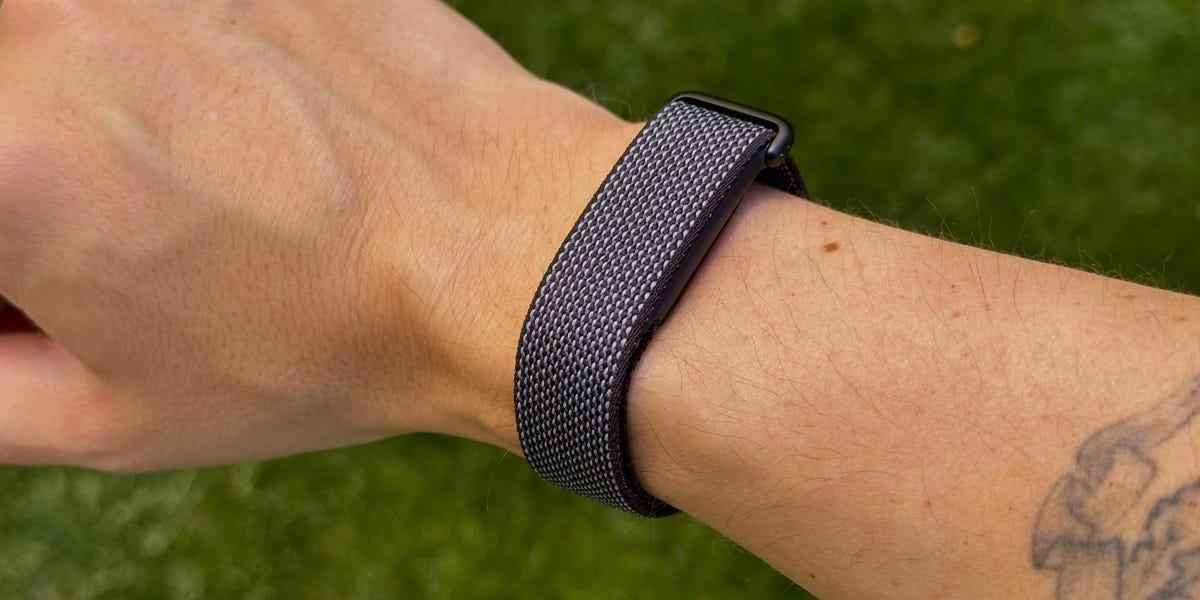
FITNESS TRACKERS HAVE become more sophisticated than ever, but they’re also getting a bit complicated. There are more sensors, more notifications, more monthly payments, and more data to make sense of, so it can be a mental workout just to keep up. Google has aimed to simplify that with the new Fitbit Air. At $99 with no required subscription, it’s a tiny, screenless band that tracks your heart rate, sleep, steps, and workouts without demanding much of your attention. You put it on, and it gets to work. Everything lives on your phone, inside Google’s new Health app, where you can check in when you feel like it.
I’ve spent the past few weeks wearing the Fitbit Air through the daily rhythms of my actual life, including inconsistent sleep, sporadic workouts, and fighting against my weakness for sweets. By now, the Google Health app has gotten pretty good at logging Ghirardelli mini chocolates (more on that later). I’ve also recently tested the Apple Watch SE 3 and the Whoop MG, two devices that sit on opposite ends of the wearable spectrum. The SE 3 is a full smartwatch with notifications, apps, and an always-on display, while the Whoop MG is a screenless data machine that tracks your recovery in obsessive detail.
The Fitbit Air feels like neither. The first Fitbit device since 2023 is not trying to replace your phone, and it’s not trying to turn your health into a full-time analytics project. Instead, it’s the tracker for people who want useful information without being overwhelmed by the data fatigue (definitely me), whether you’re training for a big race or just trying to make small improvements to your health every day.

What We Like
The Fitbit Air is small. Smaller than the Whoop MG, smaller than the SE 3, and smaller than any previous tracker Fitbit has released. Google says it weighs just 12 grams with the band and is 25 percent smaller than the discontinued Fitbit Luxe. During workouts, while sleeping, heck, while typing this review, I’ve hardly noticed it’s on my wrist. It really just feels like I’m wearing a small band without any sensor. I thought the Whoop MG was easy to live with, but the Air takes it a step further thanks to its thin, lightweight design.
When the Air was first introduced, we were excited by the prospect of being able to easily swap bands—and I’m happy to say it’s as easy as we hoped. The sensor pebble pops out of the band and snaps into a new one in seconds. I’ve been switching between the Performance Loop (the default fabric band), the Active Band, and the Elevated Modern Band. The process of switching is quick every time. If you’ve ever wrestled with swapping a Whoop band, you’ll appreciate how quick this is.
Set Up and Getting Started
Setting up the Fitbit Air is straightforward. You download the Google Health app (which replaces the old Fitbit app), pair the band with your phone, and follow the prompts. The app walks you through your health goals, activity level, and preferences before syncing your first data. The whole process is quick, and most of that was answering questions about my fitness goals.
One thing worth knowing: Some features take time to kick in. Cardio Load, for example, was still calibrating after a few days of use. Google tells you this upfront, but if you’re the type to want the full picture immediately, expect a short onboarding period while the Air learns your baseline.
Google Health and AI coach
Because there’s no screen, everything flows through the Google Health app, and at the center of it is Google’s Health Coach, an AI chatbot built on Gemini. It covers a lot of ground, offering fitness planning, sleep analysis, and general health questions, and it does a great job of keeping up when jumping between topics.
I went in skeptical. But, so far, I’ve enjoyed the Health Coach’s easygoing, conversational approach. It isn’t perfect, and I wouldn’t expect it to be. Some of its daily summaries can feel repetitive after a while. But I can tell it my goals, ask it to build a fitness plan around my schedule, or ask follow-up questions about my metrics, and it responds with something that actually feels tailored.
I told it I woke up with some shoulder pain, and it adjusted my workout plan accordingly to ensure I didn’t further aggravate the injury. It takes five seconds to have a conversation with Google’s AI coach, and it’s available 24/7. You can make any adjustments you need, and so far it’s been really helpful. As a busy dad, the AI coaching feature can handle all the mental load of figuring out how to get me feeling my best, rather than me putting together a plan from scratch.
The daily summary has been the feature I check most. Every morning, I get a Readiness score that tells me how prepared my body is for a workout based on my sleep, heart rate variability, and recent activity. After a rough night of sleep, my score came back at 53 out of 100—and instead of just showing me a number and leaving me to figure it out, the Coach told me my energy might feel choppy throughout the day, especially in the Arizona heat. It set expectations for the day before I even got out of bed.
Activity trackers generally give you charts and metrics, but require you to interpret this information yourself. The Fitbit Air, through the Coach, makes sense of all of that for you. If you do need clarification, you can ask it follow-up questions about your scores, tell it your goals for the week, or have it build a workout plan around how you’re actually feeling.
Food logging is the surprise standout. I snapped a picture of a plate of eggs, chicken sausage, and oatmeal with blueberries, and the app recognized everything and broke it down by carbs, protein, and fat. You can also log meals manually or just tell the coach what you ate. The macros breakdown is clean and easy to read, with a helpful daily goal tracker.
Here’s the catch, though: The AI Coach and several of these features require Google Health Premium, which runs $9.99 a month or $99.99 a year after the included three-month free trial. Unlike Whoop, where you can’t use the hardware at all without a subscription, the Fitbit Air still works without Premium, so you can track steps, heart rate, sleep, and your basic metrics for free. But the coaching, adaptive fitness plans, and deeper insights are behind the paywall. Even so, the annual cost is still less than half of Whoop’s cheapest tier ($199 per year).
That said, if you’re the type who wants to dive deep into your data with strain score, health span trends, and pace of aging, the Whoop MG still offers a better level of detail.
Health and Fitness Tracking
The Air tracks the same core metrics you’d expect from a modern fitness tracker. That includes 24/7 heart rate, heart rate variability, SpO2 (blood oxygen), skin temperature variation, sleep stages, and irregular heart rhythm alerts for atrial fibrillation.
Google says its new sleep tracking models are 15 percent more accurate than the previous Fitbit generation at capturing interruptions, naps, and transitions between sleep stages. Compared to the Apple Watch SE 3, the Air’s sleep duration tends to be about 10 to 15 minutes off, which is a pretty minor gap for two very different devices. The Air has a Smart Wake alarm, too, vibrating up to 30 minutes before your set alarm at the optimal point in your sleep cycle, so you’re not jolted out of deep sleep.
Workout tracking is automatic. The Air does a solid job of detecting walks and lifting sessions on its own, logging them in the app with the right duration and heart rate data. If it misses something, you can log it manually. If it misclassifies a workout, you can fix it in the app. In my limited time with the Air, I haven’t noticed any glaring issues, and it’s been reliable enough that I’m not babysitting it.
Beyond the wearable data, Google Health can also pull in your medical records, including lab results, medications, and allergies, allowing the Coach to factor them into its guidance. That means you could ask something like “How can I improve my cholesterol?” and get a response that references your actual lab numbers, not just a generic answer.
If advanced heart health monitoring is a priority, though, the Whoop MG on its Life membership offers an ECG heart screener and blood pressure insights that the Air doesn’t include.
Battery Life
Google promises up to seven days on a single charge, and in my testing that estimate has more than held up. I’ll have to see how it changes, if at all, over the long term, but right now I haven’t had to worry about battery life.
When you do need a charge, five minutes gets you about a day of use, while a full charge from zero takes roughly 90 minutes. The Air also nudges you with a notification when you have one day of battery left, and the device vibrates when it drops below 20 percent. You can double-tap the pebble anytime to check; a white LED means you’re above 20 percent and blinking red means it’s time to charge. I will say that I usually have to double-tap it twice before it realizes I’m asking to check the battery. You can also see the percentage in the app.
Compared to the Whoop MG, the Air lasts about half as long between charges, but it’s also noticeably smaller and lighter. And seven days is still a massive improvement over charging a smartwatch every night. That said, you have to take the Air off to charge it on its proprietary charger, unlike the Whoop MG, which has a wireless battery pack that slides onto the band so you can top up without removing it.
Watch Out for
The most obvious thing the Fitbit Air doesn’t have is a screen. You can’t check the time, read a notification, or glance at your heart rate mid-run. In 2026, though, I’m not sure that’s the drawback it would have been a few years ago. More people are looking for ways to cut down on notifications and screen time, and a screenless band removes that temptation entirely. If you’re coming from a smartwatch, it’s a big adjustment, but one worth considering. A solid combo could be a simple analog watch paired with the Fitbit Air, giving you the time on your wrist and health tracking in the background.
The Google Health Premium subscription is worth thinking through before the free trial ends. It unlocks compelling features like the AI Coach, adaptive fitness plans, and deeper sleep analysis. Without it, you still get a fully functional tracker with steps, heart rate, sleep tracking, and your core metrics, which is all the features some people need. But the coaching is what helps elevate the experience.
On the hardware side, I’ve noticed the default Performance Loop band feels a little stiff out of the box and not as soft as something like Apple’s Sport Loop. To be clear, it’s not uncomfortable, but it’s noticeable if you’re used to a softer fabric strap. I also spent some time with the Active Band, though I’ve never been a fan of silicone straps in general. If you feel the same way, the Performance Loop or the more polished Elevated Modern Band are better options.
Verdict
The fitness tracker market right now splits into two camps: Smartwatches that do everything and screenless bands (or rings) that focus on data. The Fitbit Air is the first device I’ve used that makes the screenless camp feel genuinely accessible. At $99 with no required subscription, the barrier to entry is as low as it gets. You’re not committing to a $359-a-year membership or a $250 smartwatch. You’re paying for a comfortable, capable tracker and deciding later whether the AI coaching is worth $9.99 a month.
After a couple weeks of wearing it, I’ve been enjoying the experience, particularly the AI Coach and food logging, which have become the features I use most. But I want to be clear: As a basic tracker without the Premium subscription, the Fitbit Air doesn’t stand out from the crowd. Fitness trackers that can count steps, monitor your heart rate, and track sleep are a dime a dozen (and where Fitbit got its start way back in the day0. What elevates the Air is the subscription. The coaching, the Readiness score, and the adaptive fitness plans are where it starts to feel like something worth considering over other alternatives.
If you want a full smartwatch experience, this isn’t it. The Apple Watch SE 3 is still our best value smartwatch for iPhone users. But if you’re curious about screenless tracking and don’t want to commit to Whoop’s subscription model, the Fitbit Air is the easiest way in.
Alternative Fitness Trackers to Google Fitbit Air


Shop All the Men’s Health Training Guides

Men’s Health Muscle After 40 At Home

Men’s Health 28-Day Belly Fat Burner Workout

Men’s Health Weight Loss After 40

Men’s Health No Gym Required: Kettlebells

Men’s Health 6-Week Lean Muscle Level-up

Men’s Health 90-Day Transformation Challenge: Abs

Men’s Health Unstoppable After 40

Men’s Health The Lose Your Gut Guide

Brandon Russell is a freelance writer covering gear and technology. He started his journey as a news writer at a small newspaper and later began reviewing smartphones, movies, and video games. In his free time, he enjoys the slower, more intentional experience of using a 35mm film camera and making short videos about movies he grew up watching.
Charles Thorp is the Fitness and Reviews Editor at Men’s Health, where he shares the best product recommendations in gym equipment, recovery tools, supplements, and more. Following an early life in athletics, Charles became a NASM-certified trainer and began writing programs alongside the most respected coaches in the world. Since entering the world of fitness content, Charles has had the opportunity to learn from and train alongside high performance individuals from the NFL, UFC, NBA, Formula 1, CrossFit, US Olympics, and Navy SEALs. When he’s not writing about training programs or gear, he can be seen at the gym or in the wild, putting them to the test.
