


We may earn a commission from links on this page.
Deal pricing and availability subject to change after time of publication.
Pricing

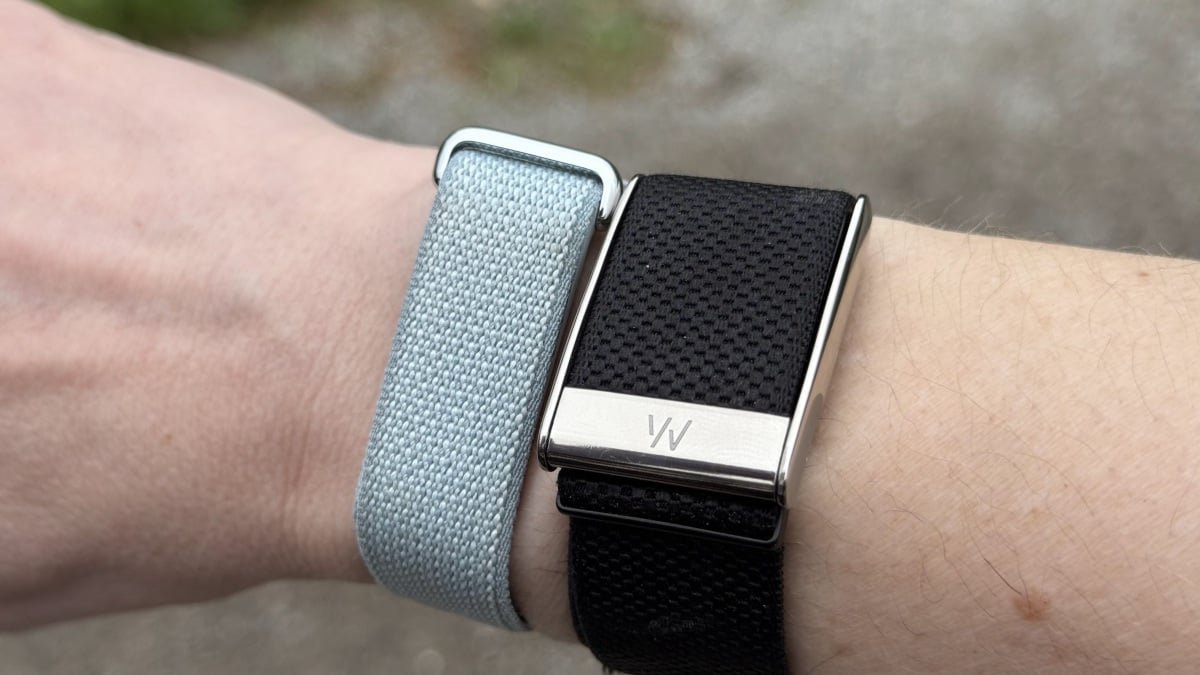
Whoop on the left; Fitbit Air on the right
Credit: Beth Skwarecki
Whoop’s subscription is notoriously expensive, so a no-subscription Fitbit Air sounds like a great alternative. But a Fitbit Air with the software features that rival Whoop will cost you about $100/year on top of the purchase price—so the difference isn’t as big as it looks.
Whoop charges $239/year for the Peak (medium-tier) subscription, which includes a Whoop 5.0 device. You’ll have to pay this every year, and there’s no way to use the device without a subscription. (There is also a $199/year “One” tier, which I think is missing too many features to be worth the small savings, and a $359/year “Life” tier, which is absolutely not worth the extra cost. I’ll stick with Whoop Peak for my comparisons.) Again, you cannot use the Whoop without a subscription. There are no basic metrics available; the app will just ask you to log in.
Meanwhile, the Fitbit Air has a purchase price of $99.99, and does not require a subscription. That sounds great at first glance, but if you want an experience that is anything like what Whoop offers, you need to pony up for Google Health Premium. That’s an extra $9.99/month, or $99.99/year.
So let’s assume you’re paying up front for each year. Here’s how the cost breaks down:
Initial cost: $239 for Whoop, $198.98 for Fitbit ($99.99 for the band, $99.99 for the yearly subscription).
Subscription terms: Google gives you your first three months of Premium free with a device purchase. Instead of paying annually, you can subscribe monthly ($9.99/month, adding up to $119.88) if you prefer. For my calculations, I’m sticking with the annual fee to make comparison easy. Whoop’s subscription is yearly only.
Cost for the second year: another $239 for Whoop Peak, $99.99 for another year of Google Health Premium—assuming subscription costs stay the same year-to-year. You’ve now paid $478 for Whoop, $299.97 for Fitbit.
If prices stay the same for a third year, you’ll be up to a total of $717 for Whoop, $399.96 for Fitbit.
If Whoop releases new hardware while you’re a subscriber, you’ll get that for “free” with your next renewal. If Google releases a new Fitbit, you’d have to pay the new purchase price if you want the new device.
Fitbit’s extra straps are $34.99 to $49.99. An extra charging cable is $24.99.
Whoop’s extra straps are $39 to $129. An extra charger is $29 for the plug-in kind, or $49 for the wireless battery pack.
Whoop is definitely pricier, but the Fitbit Air’s subscription fees aren’t cheap. That said, you can use the Fitbit Air without a subscription, and that may be enough for a lot of people. Winner: Fitbit.
What the Fitbit Air gives you without a subscription
Google is making a big deal of the Google Health Coach, which can plan your workouts, analyze photos of your meals, and provide health advice via its chatbot. But if you don’t want to use (or pay for) the Coach, the app is a lot less impressive.
Here’s a screenshot of what you see with and without a subscription. Either way, you still get your steps, your sleep (including sleep score and sleep stages), basic exercise tracking, and vitals like your resting heart rate, HRV, and skin temperature variation. The app still tracks your cardio load and estimated calorie burn throughout the day.

Credit: Beth Skwarecki
From the app’s main screen, you can log food through a search or the barcode scanner (so, yes, there is a free barcode scanner) and you can start a workout on your phone that will be tracked on the Air. The widgets at the top of the screen are customizable.
You’ll miss out on the conversational updates that the Health Coach gives subscribers throughout the day, which would tell you how well you slept or how today’s workout fits into your plans for the week. (I noticed I still get a little notification each morning telling me how I slept, but tapping it just brings me to the app, with no way to read the rest of what it said. I’m not sure if that’s an intentional teaser or a bug.)
Without a subscription, you also miss out on weekly plans, Health Coach-created workouts, the workout and mindfulness library, and “insights” from the Health Coach about your sleep and trends in your data.
Comfort and appearance

Fitbit Air, left; Whoop MG, right
Credit: Beth Skwarecki
Both companies seem to have put a lot of thought into the physical design of their devices. Whoop has a strange custom clasp that is pretty nice once you get the hang of how to operate it. (It has used a version of this style for as long as I’ve been testing Whoops, so at least back to the 3.0 generation.) Whoop’s band is about 23 millimeters wide, and it covers the plastic of the actual device, giving it a tidy look.
The Fitbit Air also has a strap that covers its device, but it’s much smaller and simpler. The strap is 18 millimeters wide, and the device is a bit thinner than Whoop (about eight versus 10 millimeters, according to my calipers). The device pops into a little oval window in the strap. My one peeve about the Fitbit is that the strap wraps around itself, rather than reversing direction when it goes through the metal loop. That makes it hard to quickly tighten or adjust with one hand. But this only annoys me for about two seconds each time I put it on, and then it’s fine.

Fitbit Air, left; Whoop MG, right
Credit: Beth Skwarecki
The Fitbit is the clear winner on shape and size, just because it’s so much smaller. I normally think of my Whoop as my thinnest and most unobtrusive wrist-based gadget, but the Fitbit Air is a clear step up. It slips easily under sleeves, and is so thin I can actually wear it next to other devices or wristbands without feeling like my wrist is getting too crowded.
How the coaching compares
What sets Whoop apart from competitors is its app. It provides a wealth of data and analysis, presented in a readable enough way that you can easily figure out what to do with it. There is a built-in chatbot that helps you understand your day’s data and plan what to do next; no other fitness tracking app I’ve tried has offered anything remotely as useful.

Whoop, left; Google Health. right
Credit: Beth Skwarecki
Google relaunched the Fitbit app as Google Health, and it now has an AI-based chatbot called the Google Health Coach. During the public beta, the bot struggled with hallucinations and a glitchy interface. The version that’s rolling out in the Google Health app is definitely improved, but still has plenty of issues.
I used both apps (and devices) side by side for over a week, and compared their responses. A few themes stood out:
The Whoop coach starts each day’s check-in with multiple data points (for example, my recovery, resting heart rate, and HRV) with a brief interpretation helping me put them together. After a few well-organized paragraphs, it will offer suggestions for the day and ask me to decide what I’d like to do.
The Google coach tends to pick one or two things to focus on, sometimes briefly mentioning a number or two, and then moving quickly to telling me what to do.
The Google coach seems to take everything I say to it as a request for a lecture. It feels like I’m being mansplained to, when I usually just wanted to give it some information it can use to plan workouts or analyze my data.
The Whoop coach uses the app’s calculated “strain” to tell whether I’ve worked hard that day or not, and calibrates the conversation accordingly. Meanwhile, the Google coach seems to guess whether each workout was hard or easy for me on an individual basis, with no rhyme or reason at all. It’s praised me for pushing through a grueling running pace when I had actually just tracked a very quick, easy jog.
The Google coach is so negative. The day before a small competition (a Hyrox half sim), Whoop told me about the positives in my recovery numbers and suggested some light workouts. The Google coach, on the other hand, put my low recovery score in the headline of its analysis, only mentioned my good sleep as an afterthought, and told me to change my plans and to not work out that day. If I didn’t already know not to trust this kind of feedback, that would have crushed my mindset heading into the competition.
The Google coach is constantly reminds me of things I’ve said before, even if I was only tapping a button it gave me. For example, I once agreed that I had “heavy legs” in a workout (it seemed like the closest answer to the question) and ever since, the coach has been asking me about my heavy legs and warning me about workouts that might make my legs feel heavy again.
What do you think so far?
To sum up, the Google coach seems so eager to help that it rushes to provide things that look like help (or like knowledgeable answers to questions) while forgetting to give me what I actually need. The Whoop coach highlights important data, gives a little bit of interpretation, and lets me choose what to do. The Google coach is constantly trying to micromanage (skip that workout today!) without using its data properly.
And then there’s the Google coach’s hallucinations. They are bad. Not as bad as in the Public Preview, but still really concerning. I said I didn’t want the coach programming barbell workouts for me, so now it keeps talking about how I’ve been doing kettlebell workouts. (I have not logged any kettlebell workouts.) When I asked whether it could show me a graph of my stress, it replied with instructions that sounded a lot like where to find that feature in the Whoop app. I said that wasn’t right, and then it gave instructions that sounded a lot like where to find body response data in the old Fitbit app (the Fitbit Air does not do body responses). In the end, it turns out the feature I was asking about doesn’t exist in the Google Health app.
OK, just one more example: when I asked the Google coach for pacing advice for Hyrox, it said that taking the rower easy will help me save energy for the sled push and pull later in the race—but the sleds actually come at the beginning of the race, before the rower. Meanwhile, the Whoop coach was able to give me a comprehensive (and correct!) guide to pacing each station. Whoop wins this one, hands down.
App features
Besides the coaches, each app has its strengths in what it can track and analyze. Here’s a breakdown of what I see as the most important differences:
Google Health can track nutrition in several ways. On the free tier, you can search for foods or scan a barcode. With Premium, you can describe a meal to the coach or upload a photo. (The estimates seem reasonably good.) Whoop does not have nutrition tracking, but it can pull data from connected apps.
Whoop has habit tracking, and can analyze the impact of your habits on recovery. For example, I recover 4% better when I’ve been taking my multivitamin.
Whoop has weekly plans that cover different areas of health. Google can make you a weekly plan for your workouts, but Whoop’s version can do a lot more. Besides workouts, you can set targets for getting certain nutrients, keeping a consistent bedtime, avoiding alcohol, or just about anything else the app is aware of.
Whoop tracks strength training better. Whoop’s strength trainer takes account of the intensity of your strength workouts when it gauges how hard you’ve worked, which Google Health cannot do (and neither can most fitness tracking apps, to be honest). This is a big plus if you do a lot of strength training.
Google Health can make workouts for you to follow from the app. This has long been a blind spot of Whoop’s: It will suggest what kind of workout might be good, but it can’t create that workout for you to follow. The Google Health app (with Premium) can create workouts that you can follow from the app, complete with exercise demonstrations and built-in timers.
Whoop does more, but the nutrition tracking and workout planning features of the Google Health app are probably going to be more valuable to more people than the more advanced and nuanced work the Whoop app can do. Personally I prefer what Whoop is doing here, but I think Google Health is the winner when it comes to what will work best for most people.
Battery life and charging
The Whoop lasts longer on a charge, and has a more convenient charger, but the Fitbit Air is also pretty good.
Google says the Fitbit Air lasts “up to seven days” on a charge. I found it did a bit better than that: The Fitbit lost about 10% of its battery life per day, giving it about 10 days on a charge (although you’d probably want to charge before it totally dies, so figure eight to nine days for typical use). It charged from 12% back up to 100% in just 50 minutes, which is impressive.
Whoop does better, though. The current generation—the 5.0 and MG—gets “14+” days on a charge, and in my testing I got closer to 20 days. It takes longer than an hour to charge, although I don’t have notes on exactly how long.
The Fitbit’s charger is a magnetic one on the end of a USB-C cable. It looks a bit like the Pixel Watch 4 charger, but isn’t compatible (yes, I tried). Whoop ships a wireless charger with its device if you have a Peak membership, which can slide on the band while you’re wearing it. It’s convenient, mainly because it’s wireless and portable; I don’t actually wear my Whoop while charging it, but I appreciate that I can charge it anywhere and not worry about finding a USB plug.
So the Whoop wins on battery life, the Fitbit charges faster, but the Whoop is more convenient to charge. If I have to declare a winner for this area, it’s Whoop, but honestly they’re both doing well.
Accuracy
The main feature of both trackers is a heart rate sensor, so we should take a look at how well that sensor tracks heart rate during exercise. I wore both trackers for an interval workout that I also tracked with a chest strap heart rate monitor. (I actually did this several times with similar results, but this is a good example of what I kept seeing.)

Fitbit in blue, Whoop in red, chest strap for reference in black.
Credit: Beth Skwarecki
The Fitbit Air is the blue line, and the Whoop is in red. My chest strap is in black, for reference. Both trackers do a pretty good job, although sometimes the Fitbit didn’t show my heart rate on the app during the workout. (That seems to be one of the many small bugs that I hope are temporary.)
But do you see that weird data point in the first interval? I had another run where I kept getting those strange data drops throughout the run. Other runs were fine, with no such drops. Whoop is the winner here: neither device is perfect, but I trust the Whoop a bit more to provide reliable data.
